
0010 : If using Additional Local Protected Directory for EPDM Local File Vault, we need to modify the shortcut of Secure EPDM Client.
Steps to modify the shortcut of Secure EPDM Client:
1. Open e-locker client installation path ( i.e. C:\Program Files\Coworkshop\Curtain 3\CBin\Shortcut )
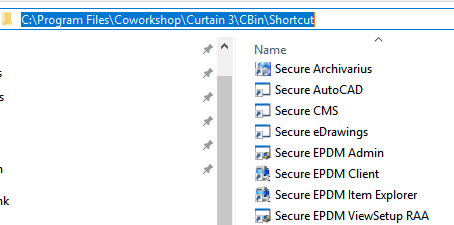
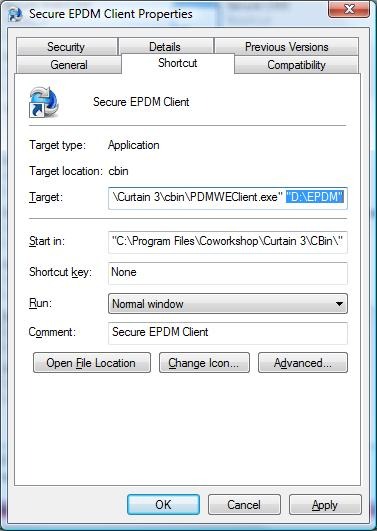
2. Select the shortcut of Secure EPDM Client and right-click to select “Properties”.

3. Enter the path of EPDM Local File Vault at the end of Target.
P.S. Please make sure that:
– You have added this Additional Local Protected Directory in Curtain Admin.
– You have used Secure EPDM View Setup to set Local File Vault to this Additional Local Protected Directory.
– Please refer to FAQ 00209 for how to protect SolidWorks Enterprise PDM (EPDM).


